 appuza
Treat CSV as a data contract
A CSV file can be simple to open and surprisingly easy to misinterpret. It carries rows and fields, but it does not carry the full behavior of a spreadsheet workbook. Formatting, multiple tabs and interactive features are not the same as the exported values. Before sending a file, agree on what each column means and what the receiving system expects. The contract can be a short note rather than a formal technical specification.
For a product list, define the product identifier, title, category and price fields. State whether an empty field means unknown, not applicable or intentionally blank. These meanings affect imports. A receiver cannot reliably infer them from appearance alone. If a file will be imported repeatedly, keep the column names and order stable unless a change is coordinated. A predictable exchange is easier to validate than a file that is manually rearranged before every delivery.
Protect identifiers from automatic interpretation
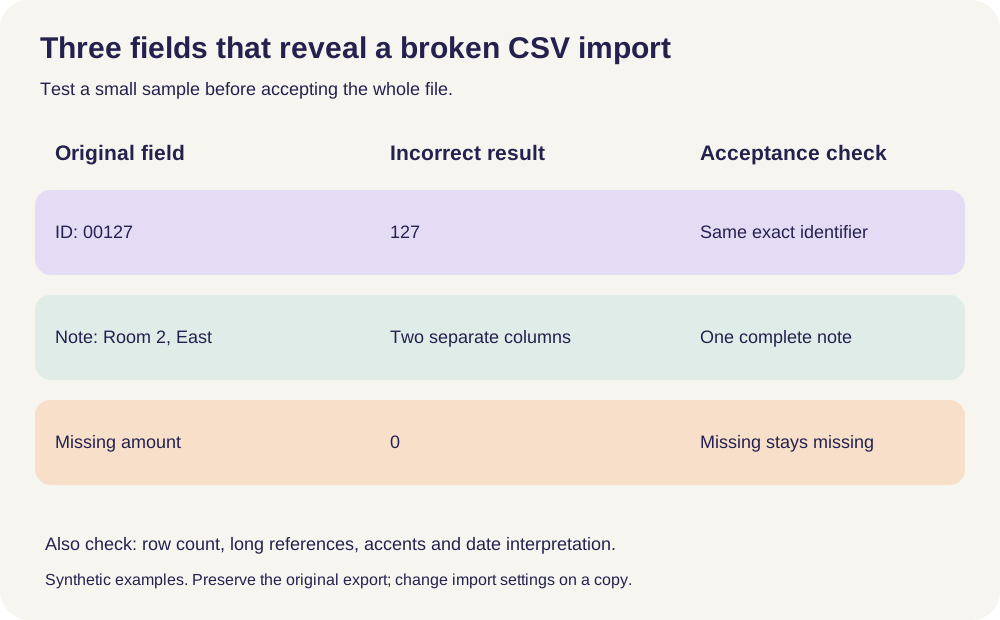
Identifiers are labels, even when they contain only digits. A code such as 00127 should not become 127 if the leading zeros are meaningful. Long numeric-looking identifiers can also be damaged by tools that treat them as ordinary numbers. During import, use the destination's controls to preserve identifier fields as text where appropriate. Do not rely on the visual appearance of a cell after opening the file by double-clicking.
Build a test file with the awkward values your real data contains: leading zeros, long IDs, commas, quotation marks, non-English characters and line breaks in a field. These examples expose interpretation problems before a full transfer. Preserve the original CSV while testing so that a spreadsheet's save operation does not overwrite it with changed values. If the destination has a published import schema, follow it and verify the result against the original values rather than assuming that a successful upload means the data remained intact.
Agree on dates, decimals and delimiters
Regional conventions can affect how a file is read. A comma may separate fields or appear as a decimal separator in some data conventions. Dates can be ambiguous when written only with numbers. Use an agreed interchange format and state it in the handoff. Google's spreadsheet settings documentation explains how locale affects default number and date formatting, which is a reminder that the editor's display context may differ from the recipient's.
Inspect the exported file in a plain-text viewer as well as in a spreadsheet. This helps distinguish the actual characters from the way the spreadsheet displays them. You do not need to manually parse the entire file, but a few representative rows can reveal the separator, quoting and date representation. Include a header row when the receiving system expects one, and avoid adding introductory prose above it. A human-friendly title line can break a machine import that expects the first row to define the columns.
Know whether you are exporting values or behavior
A formula's visible result is different from the formula that produced it. Decide which one the recipient needs. Most data exchange tasks need values, together with enough context to understand them. If the receiver must reproduce the calculation, a CSV alone may be insufficient; provide the formula logic or a suitable workbook separately. Do not imply that a flat file preserves a working analytical model merely because the numbers look the same at export time.
Relations between records need similar care. Notion's relation documentation explains that exported relation values become text URLs and do not recreate the live relations on reimport. That is a concrete example of structure being reduced during export. For a portable dataset, include stable identifiers that let the receiver reconnect related tables deliberately. A link that only works inside the original service may be useful as a reference but weak as the sole long-term key connecting two records.
Validate with counts and representative records
Record the number of data rows and a few checks before export. For a catalog, you might compare the count of unique IDs and the number of missing titles. For a request log, you might check totals by status. After importing into the destination, repeat the checks. Matching counts do not prove every field is correct, but mismatches quickly reveal truncation, duplicate handling or rows rejected by the importer.
Inspect boundary cases directly. Check the longest title, an identifier with leading zeros, a record containing a comma and a record with a blank optional field. If the importer reports warnings, save them and resolve their meaning before treating the transfer as complete. A warning about an unknown column may be harmless if that field was intentionally omitted, or serious if it contains the primary identifier. The decision depends on the contract you defined at the start, not on whether the interface displays a green success message.
Send a small, clear handoff package
Deliver the CSV with a short README or message stating its purpose, export time, row count, field definitions and any known limitations. If the file contains sensitive data, use an appropriate approved transfer method and restrict access to the intended recipients. Do not include unrelated columns simply because they were present in the source workbook. A clean exchange contains what the recipient needs and no more.
Retain the source and export record long enough to investigate discrepancies under the project's retention rules. If the exchange becomes recurring, automate the validation before automating the delivery. A fast pipeline that silently changes identifiers is worse than a slower process with clear checks. The goal is not just to create a file that opens. It is to preserve the meaning of each record through the transition between systems, with enough evidence to explain what happened if something differs.
A small CSV fixture that catches expensive mistakes
CSV transports fields and rows; it does not preserve a workbook’s formulas, formatting or relational structure. Import this checklist alongside a representative sample before moving a complete dataset.
| Synthetic sample | Failure to watch for | Acceptance rule |
|---|---|---|
| Customer ID 00127 | Leading zeros disappear when treated as a number | Identifier remains exactly 00127 as text. |
| A long invoice reference | Automatic scientific notation or rounded digits | Compare the complete character sequence with the original. |
| Amount 1,25 | A comma is interpreted as a delimiter or different decimal convention | Agree the delimiter and decimal convention before import. |
| Note containing a comma and a line break | One logical field becomes several columns or records | The note stays in one field and the row count remains correct. |
| A café name with an accented letter | Encoding changes the text | Check the actual characters after import and after a round trip. |
| A missing field and a zero | Blank values are replaced with zero or the reverse | Keep their distinct meanings in the destination. |
Worked example — hypothetical, not a device test
A club exports member numbers that begin with zeros. Opening the CSV by double-clicking makes the first sample number appear shorter. The original export is kept untouched. The club imports the identifier column as text, checks a multiline address and an accented name, and compares row counts. Only after those samples survive does it accept the full file. Relations and formulas from the source application require separate reconstruction rather than being assumed to travel with CSV.
Keep your completed copy on your own device. Appuza does not receive worksheet entries.
Official references
These are editorial walkthroughs based on documented features, not claims of a completed device test. Product behavior can change. Send a correction.