 appuza
Offline is a sequence of requirements
A game can have single-player levels and still fail at the moment you want to play without a connection. The installation package, additional assets, account authentication, purchase verification and save selection are separate dependencies. An airplane-mode check exposes those dependencies more clearly than a description that merely calls a game casual. This guide proposes a preparation workflow; it does not certify any particular game's current offline compatibility. The useful question is whether your chosen game reaches a real playable session on your own device after a fresh launch without network access.
Begin with the trip you actually have. A twenty-minute train ride with intermittent coverage differs from an eight-hour flight followed by several days without Wi-Fi. For the train, an already authenticated session might be enough. For the longer trip, you need downloaded content, a reliable local save and enough variety to avoid relying on daily events. Choose one main game and one simpler alternative. Installing ten unfamiliar titles immediately before departure can consume storage while leaving every tutorial and asset download unfinished.
Build a small travel library deliberately
Use three categories when making the shortlist: self-contained puzzles, longer campaigns and games that depend on a shared world. These are decision categories, not guarantees. A puzzle may still require a server for progression, while a campaign may include an offline mode. Read the developer's current support information and the actual listing, then inspect the installed game's download and account screens. Keep online competitive titles outside the offline shortlist unless the developer explicitly describes a separate offline activity that satisfies your needs.
Give each candidate a travel purpose. A small turn-based puzzle might cover short interruptions; a campaign might cover a long seated session; a familiar premium game might be the fallback when your attention is low. Avoid selecting three games whose main appeal is a scheduled event. Also consider posture and sound. A landscape action game that feels comfortable at home may be awkward on a crowded bus, and a game whose clues depend on audio needs headphones or usable visual equivalents.
Run a cold-launch check
On a reliable connection, install the game, finish its initial setup and reach the first meaningful activity. Open the areas you intend to use, because additional assets may download only when selected. Create a small amount of recognizable progress, such as completing a tutorial stage. Note the account currently signed in and the name or slot of the save. Do not assume the operating system's account and the game's own account are the same identity.
Close the game completely, enable airplane mode and verify that Wi-Fi has not remained enabled. Reopen it from the home screen. Try loading your save, starting a level, completing that level and returning to the menu. A title screen alone is not a passing result. Repeat after restarting the phone if the game will be important on the trip. This is a personal compatibility check, so record the device, game version and date rather than generalizing the result to every phone or future update.
Check the second session, not only the first
The most revealing step is often reopening the game after you have already completed one offline session. Does the local progress remain? Can you choose another level? Does a daily reward prompt obstruct the menu? Is an optional advertisement unavailable without blocking ordinary play? Write down the exact boundary you encounter. A game that allows ten downloaded puzzles but requires a connection for the next pack may still be useful, provided you know that limit before leaving.
Do not clear app data or reinstall a game to investigate an offline problem while your only save is on the device. Google explains that game progress linked to a Google Account can be associated with the Play Games profile, but that does not establish universal support for every title or every kind of progress. Check the developer's own save instructions. For travel planning, retaining a working local installation is usually more valuable than experimenting with destructive troubleshooting immediately before departure.
Budget battery and storage realistically
A store's displayed download size is not a complete travel storage budget. The installed application, optional assets, downloaded audio and temporary update files can add to it. Inspect your phone's storage after opening the actual content you intend to play. Leave room for photographs, boarding passes and updates to essential travel apps. If storage is tight, remove a game you do not use rather than repeatedly deleting and reinstalling the one holding your only local progress.
Make a short battery comparison under similar conditions: similar brightness, sound output and session length. You do not need a laboratory result; you need to know whether a visually demanding game drains your device too quickly for your own journey. Lowering graphics or frame-rate settings may help when the game offers them, but readability and comfort matter as well. Keep a modest reserve for tickets and navigation. The entertainment app should fit around the trip's essential functions.
Pack a fallback and define success
Before leaving, put the two games in an easily reached folder and check both one final time without connectivity. Keep account recovery information somewhere secure and independent of the phone, but do not store passwords in a public trip note. Avoid updating the games at the airport unless the update solves a specific problem; a last-minute update may introduce a new asset download or authentication step. A stable, tested installation is the useful outcome.
A successful offline preparation record is short: game and version, content already downloaded, save identified, cold launch passed, second session passed and any known limits. If a title fails, choose another rather than trying to force an online service into an offline role. The aim is not to award an offline badge. It is to remove surprises from one specific journey, using a repeatable check that you can run again when the game, operating system or device changes.
A flight-readiness test you can repeat
This is a blank test protocol for your own device, not a list of games certified as offline. Record the game version, device and test date so a later update does not inherit an old result.
| Stage | Try this before departure | Record or stop when |
|---|---|---|
| Prepare online | Finish the initial download and open the intended level or save | Any additional asset download is still pending. |
| Remove the connection | Enable airplane mode and confirm Wi-Fi is also off | A separately re-enabled Wi-Fi connection would invalidate the test. |
| Start fresh | Close and reopen the game while disconnected | A sign-in, license or server message prevents reaching play. |
| Play the actual mode | Enter the level, campaign or puzzle you intend to use | The menu opens but the intended activity does not. |
| Save and return | Use the supported save flow, close, then reopen offline | Progress is absent, ambiguous or overwritten; keep the original save. |
| Prepare a fallback | Repeat with a second game and record storage/battery needs | Both choices depend on the same untested online service. |
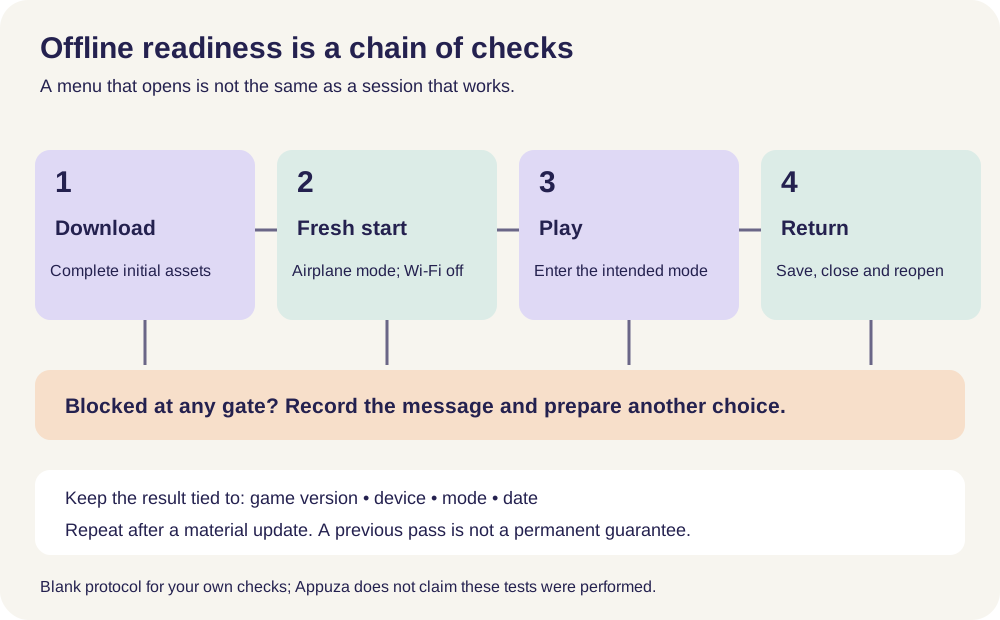
Worked example — hypothetical, not a device test
Mina launches a puzzle while connected and sees a playable board. That alone does not pass the protocol. After airplane mode and a fresh launch, the game requests a content download, so she records “blocked at fresh start.” She reconnects at home, completes that download and repeats every stage. The result applies to that tested version and mode only; it does not establish that events, purchases or every other mode work offline.
Keep your completed copy on your own device. Appuza does not receive worksheet entries.
Official references
These are editorial walkthroughs based on documented features, not claims of a completed device test. Product behavior can change. Send a correction.